RAW-first portrait camera that preserves film-like grain and tones
Captures portraits in RAW with preserved grain and film-emulation looks, producing images that feel finished the moment you press the shutter. Camera Nocta, from Cafe Sarris, targets photographers who reject AI sharpening and HDR, offering manual ISO, shutter, focus and exposure controls alongside named film presets. The app's real-time viewfinder, intentional grain preservation, and simplified interface make it suited to enthusiasts and professionals who prefer analog-style skin tones without post-capture processing.
What is Camera Nocta used for?
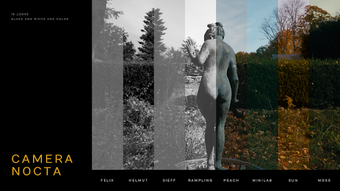
Camera Nocta focuses on portrait capture that mimics film workflows. It captures direct RAW sensor data and avoids HDR, noise reduction, and AI sharpening, so the result preserves natural grain and skin tone. The app includes film-emulation presets such as Sieff, Ronis, Helmut, and Rampling, and it encourages a shoot-and-finish practice where you choose the look before capture rather than relying on post-processing.
What formats and device requirements does it support?
The app requires RAW-capable Android hardware and outputs RAW data for integrity. It runs on devices with Android 12 or later and uses direct RAW processing to keep data intact. Automatic lens falloff correction adapts to specific mobile hardware, and exports reflect the chosen preset rather than applying later computational fixes, which matters when you need consistent, film-like output from capture to export.
How does the interface and workflow affect shooting speed?
The interface is pared back to speed deliberate shooting without post-capture fuss. Manual controls for ISO, shutter speed, focus, and EV sit alongside a real-time viewfinder that closely matches final output, so adjustments you make in the viewfinder carry straight into the image. The simplified layout reduces steps between framing and capture, which supports photographers who want a finished frame at the point of shooting.
How well does it handle low or flat lighting and portrait fidelity?
The processing favors character over smoothing, performing well in low and flat lighting. Early users praised the film recipes for preserving texture in shadows and natural skin tones; the deliberate choice to skip noise reduction keeps sensor grain visible. That approach gives portraits a film aesthetic, though it also means you accept visible grain as part of the image rather than a defect the app hides.
Best for photographers who choose capture over correction
If you prefer selecting an aesthetic before you shoot and value RAW fidelity with preserved grain, the app offers a focused path to film-like portraits. It trades automated smoothing and HDR for character and controlled manual settings, making it a practical gateway for enthusiasts and professionals who want finished-looking captures from the camera itself rather than a heavy post-workflow.